One dashboard. Every business system you add lives there.
The AGENARYS Marketplace gives business owners access to AI business systems, playbooks, accelerators, AI tools, language tools, and add-ons that install into one connected dashboard.
When you sign up or buy an AGENARYS product, you do not get scattered files, disconnected tools, or another platform to figure out. Your products appear inside your AGENARYS dashboard under My Tools, where Activation Center guides setup and AI Workspace helps you use what you own.
Customers only need an AGENARYS account. AGENARYS handles the AI runtime, dashboard, tools, usage, and activation flow.
One clean dashboard. Easy to navigate from day one.
This is your AGENARYS Home view — your AI team, activation progress, calls handled, appointments booked, and weekly reporting, all in one place. It speaks English and Spanish.
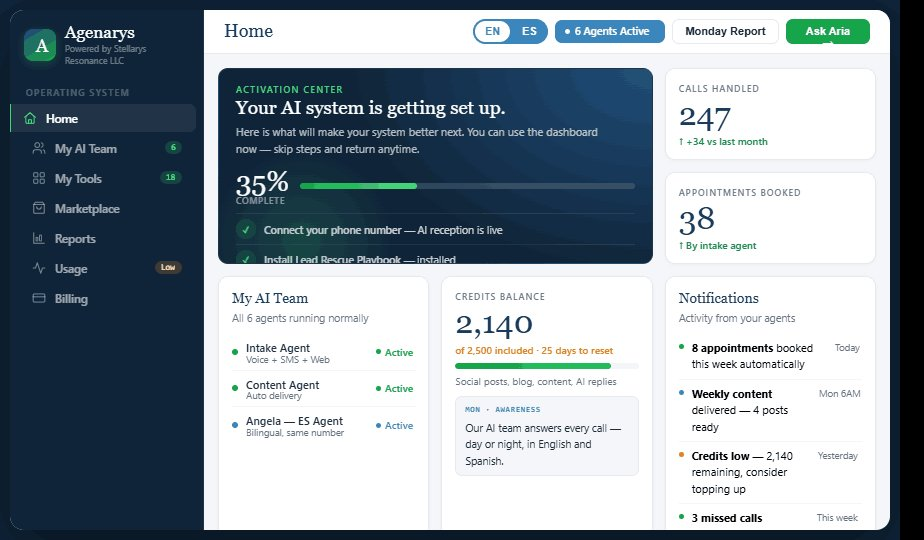
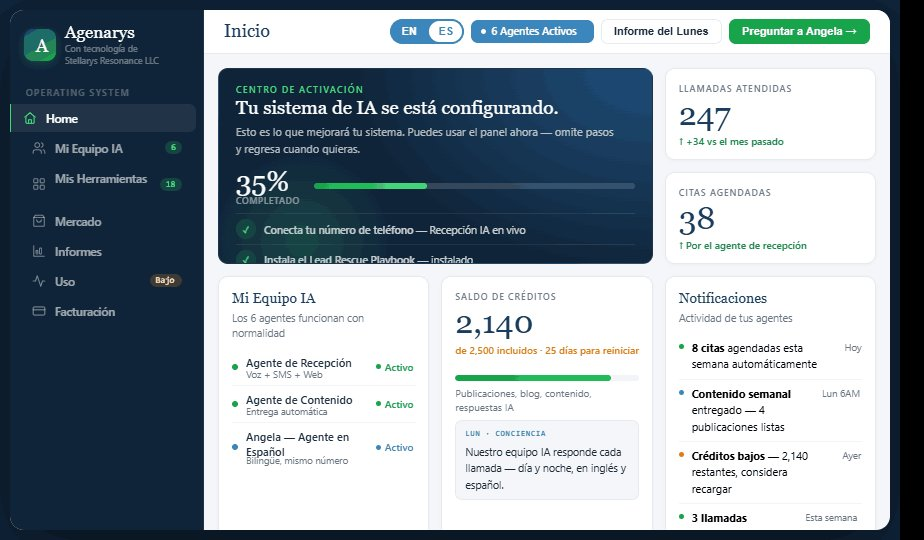
Tip: use the EN / ES toggle in the site header — the dashboard preview switches language with the rest of the page.
See what your AI campaigns look like.
From roofing to restaurants, salons to gyms — see how real local businesses use AGENARYS to answer every call, book every job, and follow up automatically, in English and Spanish.
How the AGENARYS Marketplace works
Five steps from choosing what your business needs to a system that installs into your dashboard and guides its own setup.
Choose what your business needs
Sign in or create your AGENARYS account
Purchase securely
Your product installs into My Tools
Activation Center guides setup
Your AGENARYS dashboard is the delivery system.
Everything you buy is delivered, activated, and operated from one place — organized around what you own and what to do next.
Home
Your starting view — status, priorities, and what needs attention.
My AI Team
The AI agents working on your business and how they are configured.
My Tools
Every product you own, ready to activate and run.
Marketplace
Browse and add new systems, playbooks, accelerators, and tools.
Reports
Clear summaries of what your AI team handled and what it produced.
Usage
Track AI call and SMS activity against your plan allowances.
Billing
Manage subscriptions, invoices, and payment methods securely.
Activation Center
Step-by-step guidance to bring each product online for your business.
What you can add to your dashboard
Six product types work together inside one AGENARYS account — from full operating systems to focused tools and usage packs.
Business Systems
Full operating systems that run a core area of your business.
Playbooks
Structured guidance that teaches your AI what to do.
Accelerators
Modules that do configured work automatically.
AI Tools
Expand what your business can create, monitor, and operate.
Language Tools
Serve customers in English and Spanish with bilingual support.
Credits & Usage Packs
Add capacity for AI activity within your plan allowances.
Playbooks and Accelerators are not the same thing.
Playbooks give your AI the structured knowledge and step-by-step approach for a specific outcome — so it knows the right move before it makes one.
Accelerators carry out configured actions for you on a recurring basis — turning the plan into ongoing motion without manual effort.
From seeing what changes to running the whole engine.
Each layer builds on the one before it. Start anywhere, expand over time.
The operating systems at the core
Full business systems that run a core function of your operation end to end.
Sentinel
Watches your front line — calls, messages, and inquiries — so nothing slips through unanswered.
More info →Commander
Runs your full growth engine — coordinating intake, follow-up, content, and reporting in one system.
More info →Restaurant Menu AI
Turns your menu into an intelligent system for orders, questions, and guest interactions.
More info →Zone Leader OS
Maps your local presence and surfaces what is broken or underperforming in your area.
More info →Market Intelligence
Reads broader business and market signals so you understand the landscape around you.
More info →AGENARYS Private Grid
Future private execution and advisor review path for sensitive workflows. Not available for sale, setup, quote, or activation yet.
Not available yetTeach your AI the right move
Playbooks give your AI the structured approach for a specific outcome.
Lead Rescue Playbook
A structured approach for recovering leads that went cold or unanswered.
More info →Local Visibility Playbook
Steps for strengthening how your business shows up across local channels.
More info →Review Recovery Playbook
A method for responding to reviews and rebuilding reputation over time.
More info →Sales Friction Review
A guided review that surfaces where prospects stall before they buy.
More info →Operations Readiness Playbook
A checklist-driven approach for tightening day-to-day operations.
More info →Enterprise Private Execution Setup
A controlled setup path that teaches your AI how to prepare Private Grid, use verified requests, protect sensitive workflow data, and stop for advisor review. Future release only; not available yet.
Not available yetPut the work on autopilot
Accelerators carry out configured actions automatically, on a recurring basis.
Neighborhood Pulse
Monitors local activity and keeps a steady read on your surrounding area.
More info →VIP Chair-Filler
Works configured outreach to keep high-value slots and appointments filled.
More info →Status Guardian
Tracks status across key touchpoints so issues are caught early.
More info →Catering Executive
Automates the configured steps behind catering and large-order requests.
More info →Inventory Shadow
Keeps a quiet watch on inventory signals and flags what needs attention.
More info →Churn Shield
Runs configured retention actions to protect at-risk customer relationships.
More info →Expand what your business can do
Focused tools that add new capabilities — and bilingual tools that let you serve more customers.
Language Intelligence Tools
Bilingual EN/ES tools — Local Assist AI, DocuSimple, VoiceStyle AI, and the Bilingual Bundle.
More info →What happens after you buy
The moment your purchase clears, AGENARYS takes over the setup path.
It appears in My Tools
Your product installs into your dashboard automatically and is ready to activate — no files to download, nothing to configure elsewhere.
Activation Center shows setup steps
A clear, step-by-step path walks you through bringing the product online for your specific business.
AGENARYS starts working with your business context
Once activated, the product operates using your services, hours, and details — inside the same connected account.